Zdobienie

The Horsehead Nebula Complex: Barnard 33, IC 434, and the Flame Nebula (NGC 2024) – An Astrophysical Analysis

Zdobienie

The Horsehead Nebula Complex: Barnard 33, IC 434, and the Flame Nebula (NGC 2024) – An Astrophysical Analysis

The Laboratory of Gravity and Radiation

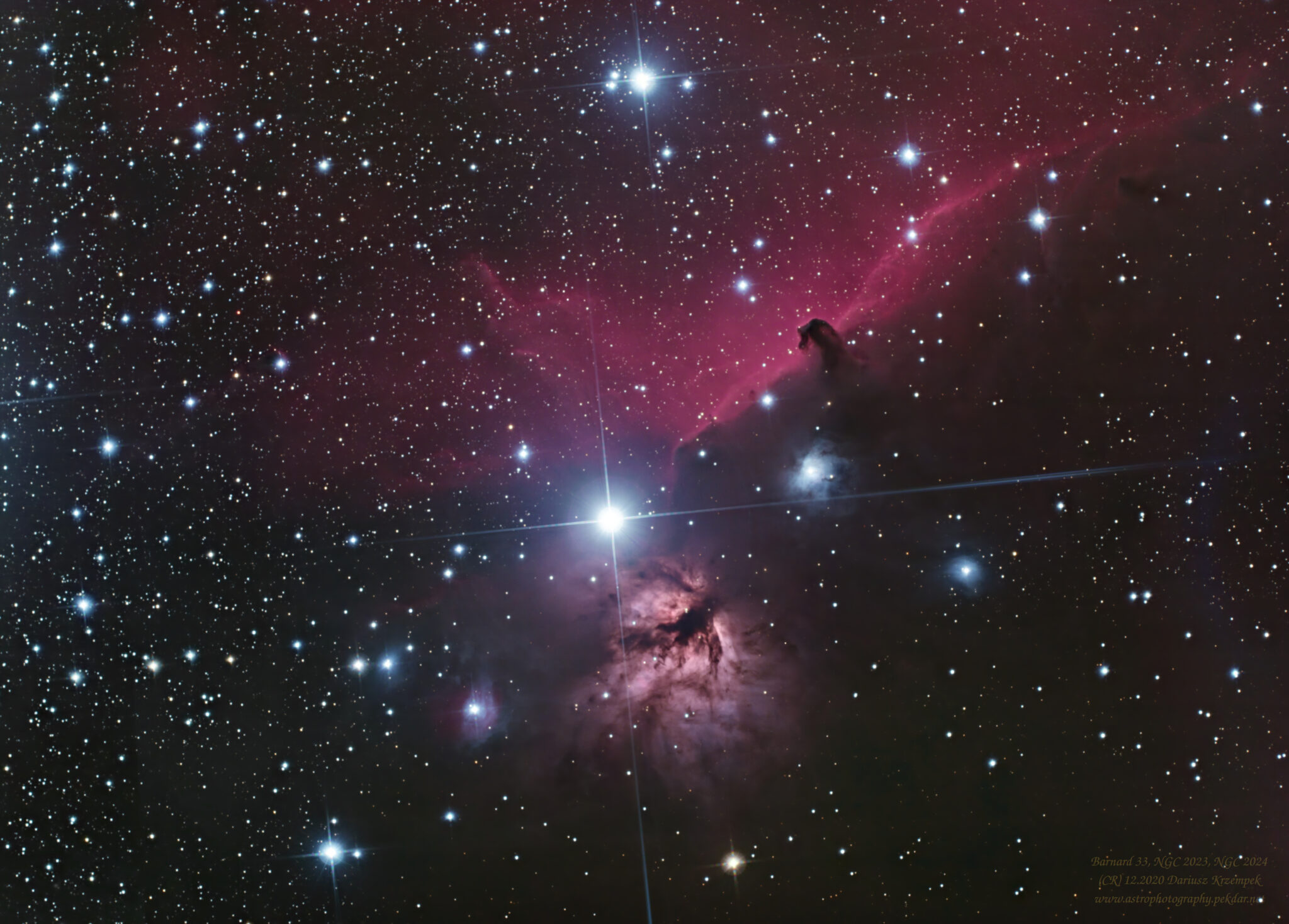
The Horsehead Nebula Complex, located within the constellation of Orion, is one of the most important and instructive regions in our Galaxy. Situated at a distance of approximately 1500 light-years from Earth, it serves as the closest active star-forming zone to us, providing a textbook laboratory for interstellar physics.

This image focuses on the dynamic interaction of three fundamental types of cosmic matter that coexist within a single frame:

  1. Emission Nebulae (IC 434, NGC 2024), which emit light due to hydrogen ionization.

  2. Dark Nebulae (Barnard 33), which absorb light, forming dense, cold cocoons.

  3. Reflection Nebulae (NGC 2023), which merely reflect and scatter light from a nearby star.

The primary engine and sculptor of this region is ultraviolet (UV) radiation, emitted by massive, short-lived stars such as Alnitak ( Orionis) and Sigma Orionis. Their energy creates powerful stellar winds and generates shockwaves that, over millions of years, erode and compress the parent clouds of gas and dust. Consequently, this image is a visual record of the ongoing cycle of cosmic destruction and creation.


Three Nebula Types in One Frame

The Orion Complex serves as a laboratory showcase, demonstrating how the powerful ultraviolet (UV) radiation from nearby massive stars—such as Sigma Orionis and Alnitak—affects the structure and luminosity of the interstellar medium. In this single frame, we witness textbook examples of three fundamental mechanisms of light-matter interaction.

The Emission Background: IC 434 (Hydrogen Ionization)

The bright, red background dominating the frame is IC 434—a gigantic cloud of hydrogen. This is a classic emission nebula (H II region), which does not reflect light but rather emits its own light through the process of electron recombination.

  • Mechanism: High-energy UV light, originating from the distant but incredibly powerful star Sigma Orionis, strips electrons from hydrogen atoms. When these electrons “recombine” (drop back to lower energy levels), they emit a photon.

  • Color/Signature: This process is responsible for the characteristic deep red glow seen in images, dominated by the H-alpha line ().

  • Crucial Role: IC 434 acts as the “projection screen” for the Horsehead Nebula (Barnard 33). Without this emission background, the dark silhouette of B33 would be invisible.

B33 / NGC2023 / NGC2024 / ASAS 053739-0146.3


Barnard 33 (Dust Erosion)

The distinctive black silhouette shaped like a chess piece is Barnard 33. This is a dark nebula—one of the most famous molecular clouds in the Milky Way.

  • Mechanism: Barnard 33 is not a lack of matter, but an extremely dense, cold molecular cloud of dust and gas that is too thick to let light from IC 434 pass through. The cloud actively absorbs light from behind it, creating the high-contrast silhouette.

  • Shape and Erosion: The specific “horsehead” shape is the result of photoevaporation. The intense UV radiation from IC 434 (which ionizes hydrogen) simultaneously destroys and evaporates the outer layer of B33.

  • Future: Barnard 33 is a remnant: its density allows for star formation within its core, but it is being gradually “eaten away” by the radiation of its stellar neighbors.

B33 (full frame)


The Flame Nebula (NGC 2024)

Dominates the right side of the frame. Similar to IC 434, it is an emission region, but its dynamics are more violent due to the proximity of its energy source.

  • Power Source: It is ionized by the nearby star Alnitak ( Orionis), the easternmost star of Orion’s Belt, though Alnitak itself is not located in the nebula’s core.

  • Structure: The UV light from Alnitak is so intense that the nebula appears to be “burning” toward the star. The characteristic dark filaments are dense dust positioned in front of the brighter emission gas.

  • Star Formation: Behind these dark filaments in the Flame Nebula, astronomers have detected numerous protostars—the Flame is one of the most active and closest star-forming regions to us.

NGC 2024 (full frame)


The Reflection Nebula (NGC 2023)

The small, blue glow at the base of the Horsehead is NGC 2023. It is one of the brightest examples of a reflection nebula.

  • Mechanism: Unlike IC 434 (which emits its own light), NGC 2023 merely reflects the light from a star located within its core (HD 37903).

  • Color/Physics: It glows blue because the process is the same one that gives the Earth’s sky its blue color—Rayleigh Scattering. Short wavelengths (blue) are scattered much more effectively by fine dust grains than long wavelengths (red).

  • Conclusion: This object completes the complex, demonstrating all three states of matter-radiation interaction: emission, absorption, and reflection.

NGC 2023 (full frame)


ASAS 053739-0146.3 (USNOA2 0825-01610019) – Variable star

Spectral type: M9 (Red dwarf, coolest)

Surface temperature in the range: 2,400–3,700 K

IR – Infrared wave source

Mag: 15.35

Stars M class are most common. About 76% of the main sequence stars in the spectral band of the Sun (class G) are class M stars (red dwarfs), their brightness is so low, that it is impossible to see them with the naked eye, except under exceptional conditions.

The brightest known M class main sequence star is M0V Lacaille 8760, with magnitude 6.7 (the limiting magnitude for typical naked-eye visibility under good conditions is typically quoted as 6.5). So, it’s very unlikely that any brighter example of a class M star, will occurs anytime soon. But we can’t this completely ruled out.

As you can see in the example photo, with a telescope with a focal length of 420 [mm], brightness F2.8 and a sensitive RGB camera, by exposing a selected area of the sky long enough, you can register stars of the spectral type M (coolest red dwarfs) with very low brightness (15.35 mag) with a very clear presence in the entire frame.

It’s worth noting that red dwarfs burn out very slowly, which means they can be very, very old compared to other types of stars.

ASAS 053739-0146.3 / USNOA2 0825-01610019 (full frame)


Technical information

  • Date: 12.2020
  • Composition: APP
  • Processing: APP, RawTherapee, GIMP + add-ons (Linux),
  • Lights: 170 x 60[s] (2h 50min.),
  • Calibration frames: Flats, Bias, Darks.


Own study based on sources:

– https://en.wikipedia.org/wiki/Stellar_classification

– https://en.wikipedia.org/wiki/Stellar_classification#Class_M

– https://astrobackyard.com/types-of-stars/#:~:text=%20The%207%20Main%20Spectral%20Types%20of%20Stars%3A,Arcturus%29%207%20M%20%28Red%29%20%28%20Betelgeuse%29%20More%20

– https://en.wikipedia.org/wiki/Flame_Nebula

– https://en.wikipedia.org/wiki/NGC_2023

– https://en.wikipedia.org/wiki/Horsehead_Nebula

Support my work on Ko-fi

Did this guide help you?

I create these guides and projects as a hobby. If I helped you save time or money, consider supporting my work with a coffee. It keeps the energy flowing for future projects.

Categories
Newest articles

iOptron CEM 25P

iOptron CEM 25P RA axle bearings replacement

iOptron CEM 25P RA axle bearings replacement. Instructions for how to replace faulty RA-axis bearings (6907) in the iOptron CEM 25P mount yourself. Eliminate friction and improve tracking accuracy. Do…

Support

Was description useful? Consider to support author, it prevents to post annoying ads for you. All you just could do is once a year, sponsor for me a coffee. The currency, amount, doesn’t matter to me. Matter to me, that you want!

Read

Similar Articles

SynScan controller firmware update

SynScan controller firmware update – NEQ6Pro

WARNING – the author of this manual accepts no responsibility, for any damages that may occur as a result of following this manual. All actions described in this manual are undertaken at your own risk. SynScan controller firmware update – Introduction   Starting from version 3.0, users can independently update the firmware of SynScan controllers for NEQ mounts. Simply download the latest software version from the Sky-Watcher website and perform the update following the instructions provided here. Requirements SynScan™ Hand Control of version 3.0 or later. Windows 8.1 or later An available RS-232C communication port on the PC RS232-USB hardware converter in case of missing DB9 COM port in your laptop / PC PC link cable that comes with the SynScan™ hand control DC power supply with 12~14V/1A output. Power plug should be 2.1mm diameter, tip positive.      Preparation for update Create a directory called SynScan, preferably on your C: drive. Visit the Support Page of the Sky-Watcher website at https://www.skywatcher.com/download/software/ Download and save two files, follow with example: Windows program: SynScan Firmware Loader, Version 3.5 – click with Download button. you’ll save a file with name: synscan_verXXXXXX_firmware_release.zip where XXXXXX – is a version nr Next download Firmware: SynScan V4/V5 Hand Controller For All GO-TO Mounts, Version 4.39.21 – click on Download button you’ll save a file with name: synscanfirmwareloader_verXX.zip where XX – is version nr Connecting devices Connect the USB-COM (RS232) adapter to the computer’s USB port.   Connect the male COM plug of the adapter to the female COM plug of the SynScan controller cable.   Connect the RJ-11 plug of the controller’s COM cable to the RJ-11 port on the controller. Ensure that the plug is securely inserted—you should hear a distinct “click” as the plug snaps firmly into place in the controller’s socket.   Connect the controller to the mount using the dedicated cable – RJ45 plug to the COM port on the mount. Ensure the cable is securely connected to both the controller and the mount for proper communication during operation. We now have the following connection setup – example:   Firmware update the SynScan™ Hand Control On the controller, simultaneously press and hold the buttons “0” and “8.” Turn on the mount’s power as shown in below photo. The controller will emit a “beep” sound during startup and then display the message “SynScan Update Ver….” as shown in the image. The controller has now been set to firmware update mode. This indicates that the device is ready for the next steps in the firmware update process. On your computer, run the Computer Manager and find the COM port which will be used for update. With this example it is COM5. Check the COM port number on your system. Open Computer Management and locate the COM port. To do this on a Windows system: Press Win + X and select Computer Management from the menu. In the Computer Management window, navigate to Device Manager. Expand the section labeled Ports (COM & LPT). Here, you will see a list of available COM ports along with their assigned numbers (e.g., COM1, COM2). With this example it is COM5. Run the SynScanFirmwareLoader.exe software on your PC. Once the program is launched, you should see a window SynScan Firmware Loader , make sure the “Auto-detect COM Port” checkbox has been unchecked. Set the COM port. Click the HC Version button. The program will attempt to connect to the controller and retrieve information about the hardware version, firmware, and the celestial object database. You will see the version numbers at the bottom of the Firmware Loader as shown on below picture. If the program is unable to communicate with the controller, enable the Auto-detect COM Port option and click the HC Version button again. If the Loader program cannot detect an available COM port, check the connection between the controller and the computer. Click Browse to select the SynScanVXXXX.ssf file in the SynScan folder. It is recommended to enable the – Enforce database update – option and then click the Update button to start the update procedure. This ensures that the entire database is refreshed during the update process, reducing the risk of any errors or omissions. The update status can be monitored under the Update and HC. Version buttons. Update Complete. Click on the HC. Version button and check if the controller has reported a new Firmware version. The update was fully successful. Close the Loader program and turn off mount power suppl. Turn the mount’s power back on and check whether the controller displays the new firmware version. Check if the mount and H.C. works properly. As you can see, the firmware update process for the SynScan V4 controller is not overly complicated, but it does require careful attention. It’s crucial to follow all the steps outlined in this guide in the correct sequence, with focus and precision. I hope the description provided could be at least somewhat helpful.   It’s worth mentioning that the mount performs excellently in the field when used with the PERUN II power bank.

Read more...