Zdobienie

Merope Nebula (NGC 1435) – The Physics of Blue Dust in the Pleiades

Zdobienie

Merope Nebula (NGC 1435) – The Physics of Blue Dust in the Pleiades

A Lighthouse in the Fog

This image reveals a fragment of one of the most dynamic regions of the M45 cluster (The Pleiades). While the bright stars draw the eye, the key engineering and physical object here is the matter surrounding them – The Merope Nebula (NGC 1435). The smaller stars visible in the frame, identified as HD 23463 (spectral type K2) and HD 23479 (type B9), serve as excellent reference points for analyzing the density and structure of the surrounding dust clouds.

The Physics

Why Blue? This area is a textbook example of a reflection nebula. Unlike emission nebulae (which emit their own light, typically red from H-alpha hydrogen), here we observe a scattering mechanism.

  • Carbon and silicate dust grains act like billions of microscopic mirrors.

  • Light from the nearby, powerful star Merope (just outside the frame or at the edge) is scattered.

  • Shorter wavelengths (blue) are scattered much more efficiently than red ones (a phenomenon identical to what gives Earth’s sky its blue color).

Image and Structure Analysis

Stars HD 23463 and HD 23479 appear to be “suspended” in a delicate mist. In reality, the Pleiades are currently “passing through” an unrelated cloud of interstellar dust with a relative velocity of about 11 km/s. In the image, note the filamentary structure of the nebula. These filaments align with magnetic field lines and are shaped by the radiation pressure of nearby B-type giants. Capturing these subtle striations required high local contrast and precise denoising to avoid destroying detail in the shadows.

Star HD 23463 

   Look into the enlarged corner photo the star one above is orange. Distance from earth: 432.24 light years. The star surface temperature is estimated in the range of 3700–5200 [K]. It does not belong to the constellation Taurus, its close on its border. Invisible for the naked eye, you need binoculars or a telescope to see it.

Star spectral class: K2 – its mass relative to the sun is 0.45 to 0.8 . So, it is “smaller” than our sun. The number of stars of this class is in the 12%, of the main sequence, so when we look on the sky, these stars occur quite frequently. When we look at the spectrum of a star, we will notice that these types of stars, have significant metal lines, where in astronomy we call metal with element heavier than helium.

Star HD 2347

   It is a variable, eruptive star, blue in color. Distance from earth: 440.76 light years. It is estimated that its surface temperature is in the range of 7,500 and 10,000 [K]. For comparison, our sun has a surface temperature of around 5.770 [K]. So, it can be even twice as hot as our sun.

The spectral class of the star: A – The mass relative to the sun is 1.4 to 2.1 times greater. This type of stars only quantitatively feeds 0.6% of the main sequence. They are clearly visible in the sky. Sirius and Vega belongs to the type A main sequence stars.

On the enlarged photo it is below, right next to the HD 23463 star.
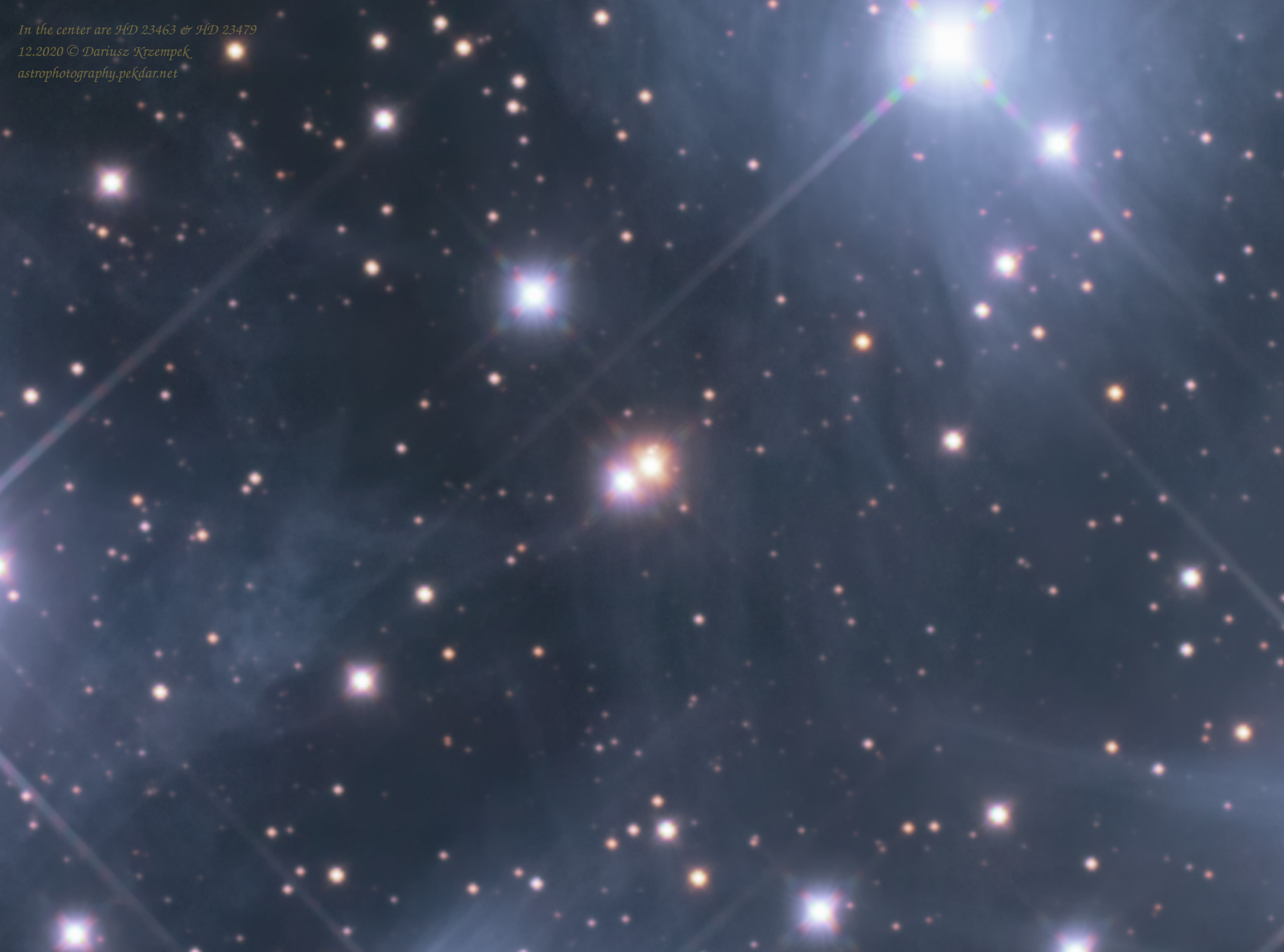
HD 23463 and HD 23479 - crop
HD 23463 and HD 23479 – crop

M45-SummaryStack-crop-cbg-csc-St-RT-Base.v1.0.HD23463HD23479.jpg

Main sequence stars: https://en.wikipedia.org/wiki/Main_sequence

Diagram Hertzsprunga-Russella: https://en.wikipedia.org/wiki/Hertzsprung%E2%80%93Russell_diagram

Technical information

Location: 12.2020
Composition: APP
Processing:
APP, RawTherapee, GIMP + add-ons (Linux)
Summary exposure: 6h
Calibration frames: Darks, Bias, Flats

Support my work on Ko-fi

Did this guide help you?

I create these guides and projects as a hobby. If I helped you save time or money, consider supporting my work with a coffee. It keeps the energy flowing for future projects.

Categories
Newest articles
Support

Was description useful? Consider to support author, it prevents to post annoying ads for you. All you just could do is once a year, sponsor for me a coffee. The currency, amount, doesn’t matter to me. Matter to me, that you want!

Read

Similar Articles

SynScan - PCB - pads

SynScan GOTO controller – trouble with buttons

Even though this article has been around for ages, it still offers valuable insights and practical support for users of the SkyWatcher NEQ6Pro mounts. The content has been refreshed and tailored to match the current website engine, making sure everything looks and runs as smoothly as possible.     At some point while using the controller, I noticed that the ESC button wasn’t always working. I lived with it, but after a while, the left Ra button also started acting up and wouldn’t always connect. A red flag went up in my head – something needed to be done. It’s worth noting that the problems appeared right after the warranty period ended… coincidence? There weren’t many options, just two: either send the controller for service and pay a considerable amount for the repair, or try to fix it myself. My tinkering nature took over (as always), and I set about solving the problem on my own. I assumed that some dirt or substance must have gotten inside, which over time became sticky and was gripping the button. I don’t recall spilling any liquid on the controller, but I also can’t rule out a situation where rain or high humidity (fog) penetrated the controller’s interior. My recent, not-so-great experiences with electronics, especially those manufactured in China, gave me an idea of what I might find inside, so I prepared a few things for the job. Contact spray – quite a nice product for cleaning and degreasing electronics and optical devices, including removing contaminants from glass without damaging optical coatings.Cotton swabs are a must-have. Plastik 70 spray – in my electronics work, I usually reach for Plastik 70 spray (clear lacquer). It creates a thin, transparent, and, most importantly, sealed coating. It excellently protects soldering points from the tin components oxidizing and forming ‘cold solder’ joints, which stop conducting electricity relatively quickly after service work.A small, so-called artistic brush will be necessary to precisely and evenly spread the Plastik 70 over the repaired surfaces. Let’s get to work. We’re unscrewing the controller; it’s held together by 4 Phillips head screws. There are no clips, so slowly and gently, but without excessive force, we remove the housing. On the left side, carefully disconnect the white ribbon cable (signal) with the white plug and the plug with the colored wires (power). Grab the PCB board from the left side and slowly, gently turn it over to the right side. Contamination is visible at the soldering points of the white ribbon cable. Below, you can see dirty pads for the ESC button. Now I know where the problem with the uneven operation came from; it would connect sometimes and sometimes it wouldn’t – irritating. It’s not that visible in the photo, but the direction button pads weren’t exactly clean either. It was quite noticeable under the light. The opposite end of the controller, was also dirty. The soldering points of the disconnected plugs. The button pads were also dirty. I’m at my wit’s end. There’s no choice, the entire PCB will have to be cleaned. How to clean without breaking anything? Spray a little of the substance into the removed cap from the contact cleaner and dip a cotton swab in it. Lightly wipe out the dirty areas. Repeat the process until all the dirt is removed. Once you’ve cleaned all the areas, you need to protect the soldering points. Plastik 70 and a brush will be used for this purpose. The procedure is very similar to cleaning. Spray a little of the substance into the removed cap. Use the brush to apply the Plastik 70 to the soldering points. Wait 10 minutes for the applied Plastik 70 to dry.” View of the controller after cleaning the soldering points of the electronics, pads, and applying a protective plastic coating to the soldering points: I think it turned out quite decently. In my assessment, that’s everything. All that’s left is to reassemble the controller and test its operation. The problems that occurred earlier have disappeared.    

Read more...
EQDIRect for NEQ and EQ mounts

EQDIRect for NEQ and EQ mounts

    The GOTO controller is extremely convenient and practical to use, when you want to look at interesting night sky objects, with your own eye through the eyepiece mounted in the telescope’s focuser. The ability to quickly select an object using the GOTO controller, is invaluable. It’s way better using mount with PC and Here it comes the EQDIRect for NEQ and EQ mounts.     In astrophotography, however, the GOTO controller isn’t necessarily as convenient. I admit there were times when it actually got in my way. I decided to remove the controller so it would no longer intermediate the mount control; its role has been taken over by Astroberry combined with an EQDirect solution. My own implementation is based on descriptions for EQDirect available on the Internet. EQDIRect self made    The topic seemed simple, however, when it came to actually building the device myself, things weren’t so obvious anymore. Some important information is missing online. It’s easy to make a mistake that could seriously damage the mount’s electronics, as well as the Astroberry or another computer to which the EQDirect is connected. Repairing these devices can be very expensive! Once I had gathered all the necessary pieces of the “puzzle”, analyzed and double-checked the subject several times, I assembled the whole thing. Then, with a slightly trembling hand, I switched on the power to the mount. EQDIRect home made – set Luckily, nothing exploded 😉 What’s more, everything works – and it works like a charm! The mount responds to and executes all commands issued to it by the KStars+EKOS duo, along with the EQMod with INDI driver, and all of this resides together in Astroberry. EQDIRect for NEQ and EQ mounts – Astroberry configuration EQDIRect – EKOS – EQMod mount driver with setup Of course, EQDIRect will also work with ASCOM and other software that requires such a technical solution to control the Sky-Watcher EQ6, NEQ6Pro mounts. EQDIRect – EKOS – EQMod mount driver connection setup EQDirect with testing setup It works really well, even in slightly freezing conditions – tested – see the attached photos 🙂 To protect the expensive mount from damage, my EQDIRect unit is equipped with several additional electrical protections. Mount performs excellently in the field together with EQDirect when used together with PERUN II power bank. If you are interested in acquiring EQDIRect made by me, please don’t hesitate to reach out me by filling out the contact form.

Read more...
Rosette Nebula - NGC 2237 - Caldwell 49

Rosette Nebula NGC 2237 – Caldwell 49

Rosette Nebula NGC 2237.
In this article, I have gathered in one place the most interesting information about the entire nebula and its selected regions. The information contained in this content is my own compilation based on collected data.

Read more...